

WMS Mobile App

WMS Barcode System
Barcode technology is central to SphereWMS’s efficiency. Our mobile app supports various barcode standards and integrates with different scanners. The system supports complex operations like bulk scanning, automated validation, and error correction, providing flawless inventory management.
User-Friendly Interface
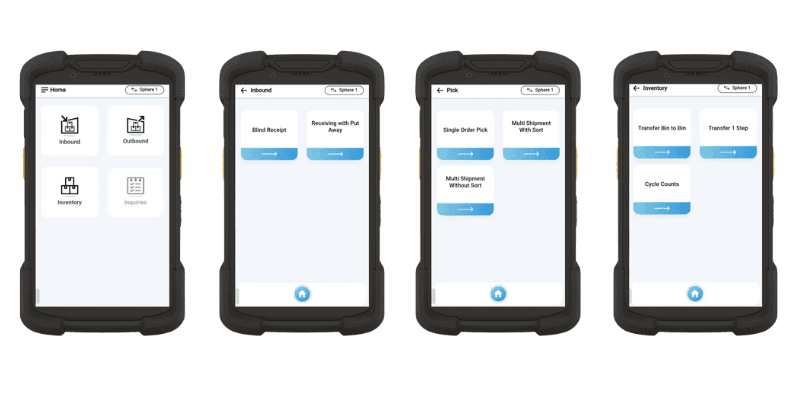
The user-centric design of SphereWMS’s mobile app ensures that complex functionalities are made simple. Interactive tutorials, context-sensitive help, and intuitive design provide a learning curve that is minimal, enabling rapid onboarding of new staff and continuous efficiency improvements for existing staff.
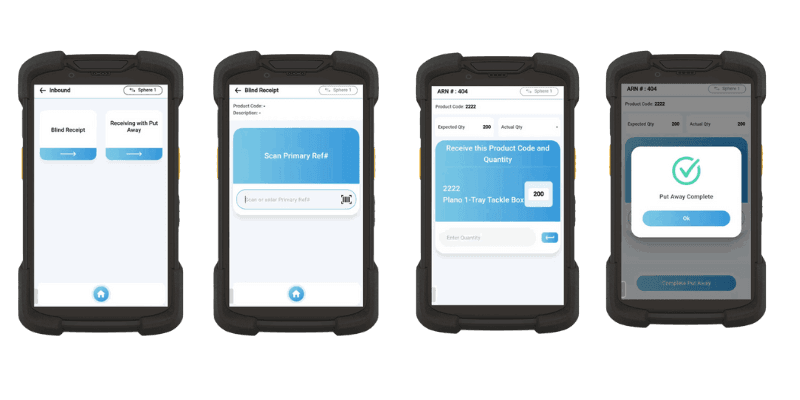
Receiving & Put Away
SphereWMS’s mobile app redefines the receiving and put-away process. It enables warehouse staff to swiftly scan incoming goods, capturing essential data and guiding the put-away to optimal locations. The system intelligently analyzes available storage space and material handling equipment, coordinating their utilization, minimizing handling costs, and improving space efficiency. With real-time updates, managers can monitor performance and make immediate adjustments.
Order Fulfillment & Shipping
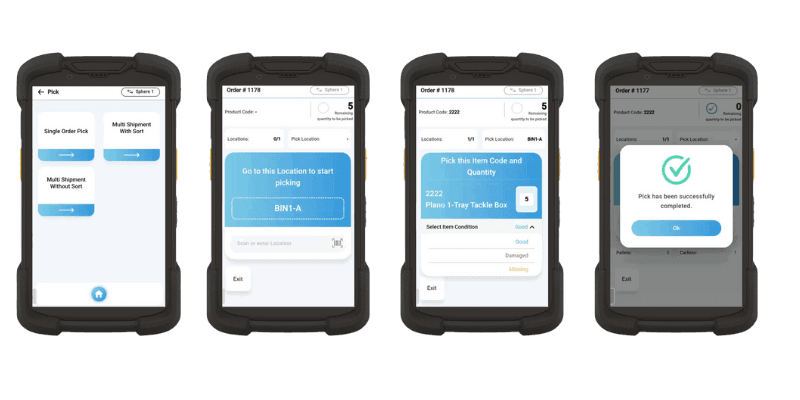
Focusing on streamlined order management, the app supports everything from order creation to final shipping. It integrates picking, packing, labeling, and shipping into a unified workflow, providing real-time updates and tracking numbers. The system’s connectivity with shipping carriers ensures accurate delivery estimates and enhances customer satisfaction with immediate updates.
Stock Transfers or Adjustments
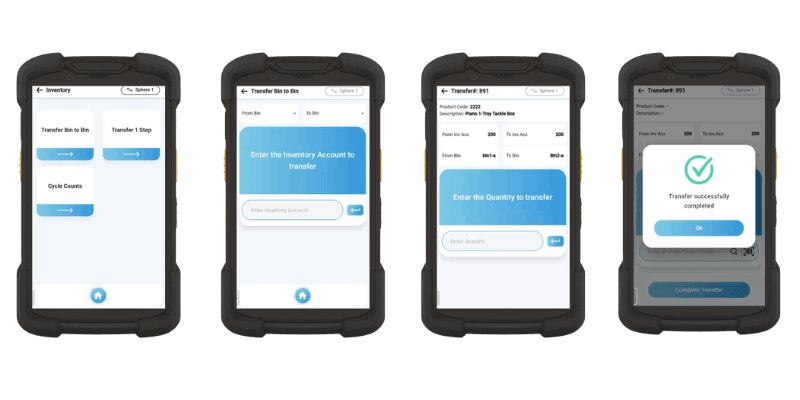
This feature provides a comprehensive interface for adjusting stock levels and transferring between locations. It offers suggestions for optimal stock placement based on historical demand, seasonality, and other influencing factors. This assists in eliminating excess stock, minimizing carrying costs, and maintaining optimal inventory levels, thus improving overall profitability.
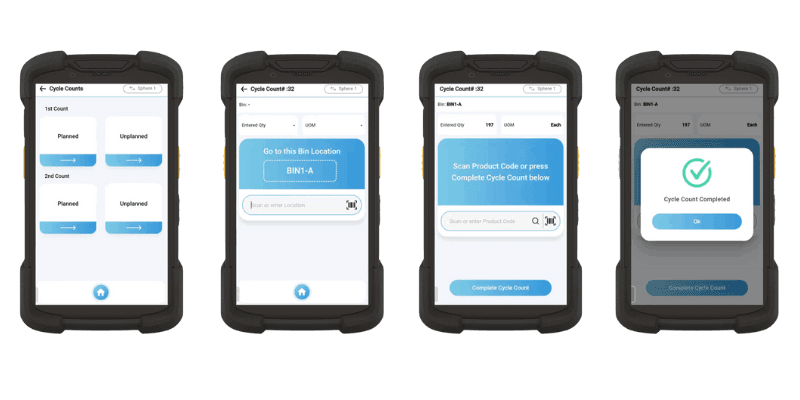
Cycle Counting
Cycle counting is essential for accurate inventory management, enabling regular counts of subsets of inventory to quickly identify discrepancies. This practice helps prevent stockouts and overstock by ensuring precise stock levels. By integrating cycle counting with SphereWMS’s mobile app, warehouse managers can perform counts efficiently and in real-time. This feature streamlines inventory control, enhancing overall operational accuracy and efficiency.

Role-Based Access Control
Customizable role-based access ensures that each user sees only what they need to, based on their role and responsibility. It facilitates the enforcement of internal security policies and compliance with legal and regulatory requirements, providing robust control over data access and modification.
Inquiries on Current Inventory Status
Beyond simple inquiries, this feature serves as a real-time window into the warehouse’s heartbeat. It provides granular details like item location, quantity on hand, pending orders, and expected shipments. This insight empowers teams to optimize inventory management and maintain seamless warehouse workflows, ensuring every item is accounted for and in its right place.


Security and Compliance
SphereWMS’s security and compliance module is built on a foundation of global standards and industry best practices. Data encryption ensures the confidentiality of information, while two-factor authentication adds an extra layer of security for user access. Regular audits, both internal and third-party, assure that the system complies with all relevant laws and regulations. Real-time monitoring and alerting mechanisms detect and prevent unauthorized access or suspicious activities. Additionally, the system offers customizable security settings to align with a company’s specific policies, providing a secure environment without compromising on functionality or usability.

Ready to Learn More?
Cloud WMS Software
Manage Your Warehouse Anywhere, Anytime
Boost Efficiency with Our Mobile App